Applies to both APIs. Registration, signing, delivery and retries are identical. Only the event catalogue differs: fulfilment adds two families on top of the order.* events both products emit.
Connector users do not register anything: the Shopify and WooCommerce connectors create their own webhooks at connect time, and those appear on the same Quiqdash screen. If a connector order stops updating, go to Integration Orders instead of this page.
Quiqup POSTs a JSON event to a URL you own when an order changes. Use webhooks rather than polling. GET /orders/{order_id} returns the current state only, so a poller sampling every few minutes will miss transitions between samples.
If you do miss events, GET /orders/{order_id}/history returns every state the order has passed through with timestamps. Use it to backfill what you missed. Do not poll it.
Quiqdash → Integrations → Webhooks.
The screen has two tabs. Subscriptions is where you register, edit, pause, test and delete. Delivery logs shows every delivery attempt and its result.
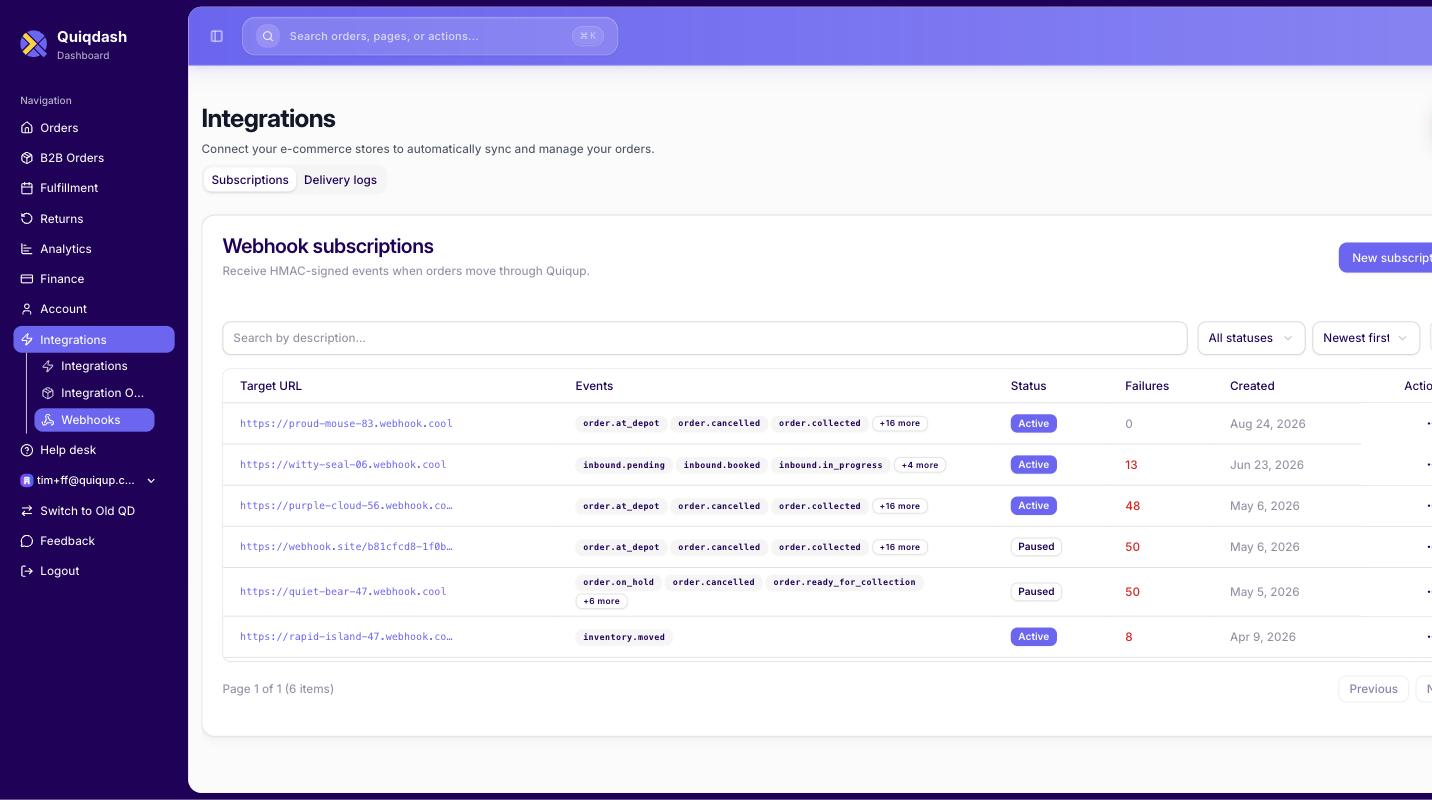
Click New subscription:
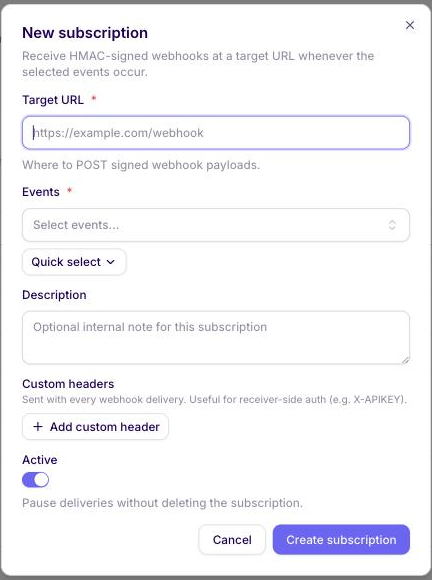
| Field | |
|---|---|
| Target URL | Required. Where Quiqup POSTs the signed payload. Must be HTTPS. |
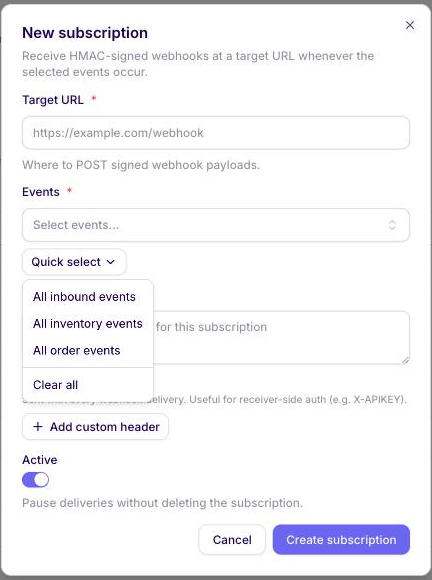
| Events | Required. Pick individually, or use Quick select for all order, all inbound or all inventory events. |
| Description | Optional internal note. Useful when you run several subscriptions. |
| Custom headers | Sent with every delivery, except a retry you trigger from the delivery log. Use this for your own receiver-side auth, for example an X-APIKEY header your endpoint checks. |
| Active | Switch it off to pause deliveries without deleting the subscription. A subscription that keeps failing is switched off for you, see Paused subscriptions. |
Once created, each subscription has Edit, Send test and Delete:
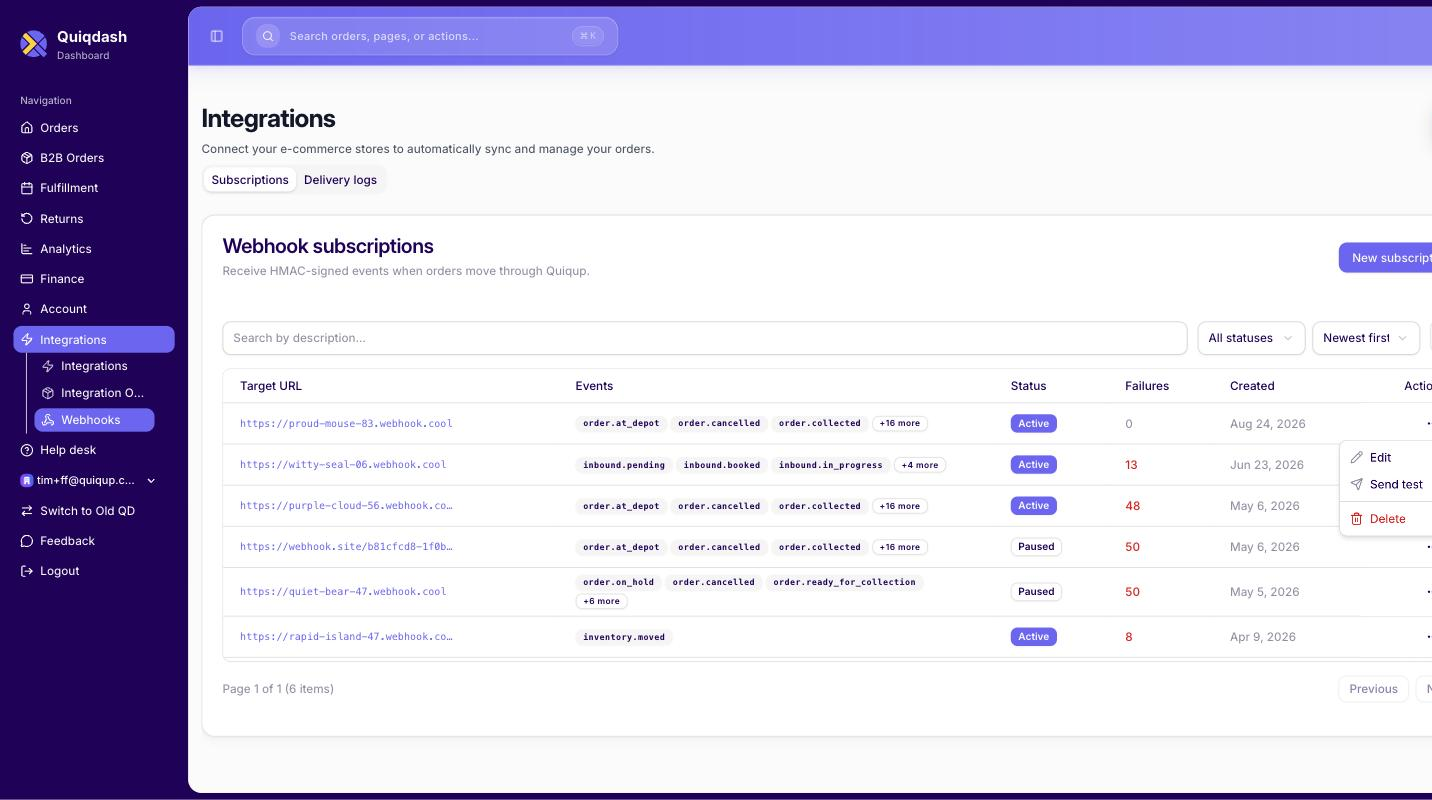
Send test fires a sample event at your endpoint. Use it to prove your receiver is reachable before you create a single order. A test is not written to the delivery log and does not count towards the failure count.
Subscriptions are per environment. A staging registration never carries over to production. Testing passes on staging, then the first real order produces no callbacks, because the production URL was never registered.
Subscriptions are per account. The same URL can be registered against several accounts. A multi-brand merchant registers once per brand, and the payload identifies which account an event belongs to: business_partner_id is the account's id and brand_name its brand. See Request shape. An order created for another account through a billing_identifier is delivered to that account's subscriptions and to yours.
A subscription is not retroactive. Only state changes after registration are delivered. Orders already in flight when you register will not be backfilled.
Every request carries:
X-Quiqup-Signature: <hex-encoded HMAC-SHA256, no prefix>
X-Quiqup-Timestamp: <unix timestamp>
The signing secret is shown when you create the subscription. After that it lives on the subscription itself: press the eye icon to reveal it. You can reveal it as many times as you like, so there is nothing to lose here.
The signature is computed as:
HMAC-SHA256(your_secret, "{timestamp}.{raw_body}")timestamp is the value of the X-Quiqup-Timestamp header. raw_body is the full request body exactly as received. Note the literal dot between the two.
The result is hex-encoded with no algorithm prefix. Compute the same value and compare in constant time.
Reject stale requests. Compare X-Quiqup-Timestamp with your own clock and reject a delivery whose timestamp is more than 5 minutes away from it, even if the signature matches. Without that check, a captured request can be replayed against your endpoint indefinitely. Every delivery attempt, including retries and a retry you trigger from the delivery log, is signed at the moment it is sent, so a legitimate retry always carries a fresh timestamp and passes. Keep your server clock synced with NTP.
Use the raw bytes of the body. A parse-and-re-serialise changes whitespace and key order, and the signature will not match.
Some subscriptions carried over from the previous webhook system also receive a second header:
x-signature: sha1=148a6d4a0e95dada696d20f702caf027b548704aThat is HMAC-SHA1 of the raw body with the same secret, with a sha1= prefix. It is a setting on the subscription, not something every integration gets: the subscription's page in Quiqdash shows a Legacy SHA1 + SHA256 badge when it is on. A subscription without the badge never receives x-signature. New subscriptions never have it.
X-Quiqup-Signature is sent on every delivery either way, so the migration is entirely on your side: verify X-Quiqup-Signature, then stop reading x-signature. You cannot switch the setting off yourself; ask apisupport@quiqup.com once your receiver no longer reads it. A retry you trigger from the delivery log carries only X-Quiqup-Signature, so a receiver that still requires x-signature rejects it.
Any 2xx. The body is ignored.
| Your endpoint | What happens |
|---|---|
| Returns 2xx | Delivered. The subscription's failure count goes back to 0. |
Times out after 15 seconds, cannot be reached, or returns 429 or a 5xx | Retried. Five attempts in total, about 1, 2, 4 and 8 seconds apart. |
Returns any other 4xx | Not retried. The delivery fails at the first attempt. |
A delivery that is still failing after its attempts counts once towards the subscription's failure count, whatever the status code, so a 4xx counts as much as a 5xx. What happens when that count grows is under Paused subscriptions.
Events may be redelivered and can arrive out of order.
There is no event id in the payload or the headers, so you cannot deduplicate on one. Key on payload.id plus payload.state plus state_updated_at, and ignore anything older than the state you already hold. Applying the same transition twice has to be safe.
Quiqup emits a named event per transition. Subscribe to the ones you need rather than all of them.
The full list is in Order statuses and their events, mapped against the state each one corresponds to. It lives there rather than here.
Nineteen order events, all subscribable individually. All order events in Quick select selects exactly these nineteen:
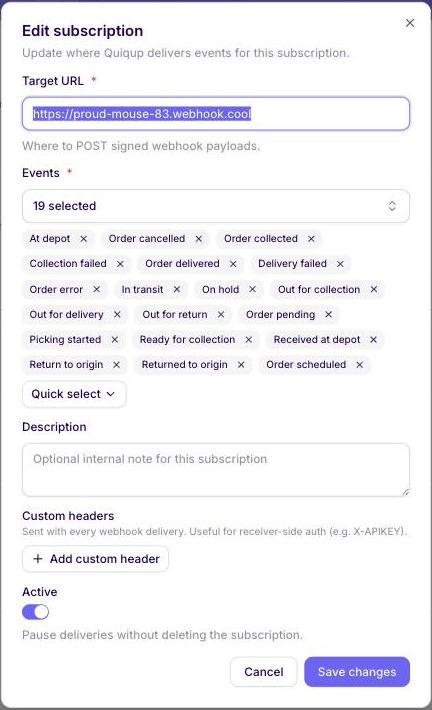
Both a fulfilment order and a last-mile order emit these. A merchant running both products gets one stream, not two.
order.ready_for_collection does fire. Earlier guidance said marking an order ready for collection emits nothing. Live delivery logs show it delivered with a 200, so build for it.
The event name follows the state. An order event is order. plus the state the transition moves to, so state: out_for_delivery arrives as order.out_for_delivery. That mapping holds for every name seen in live delivery logs.
Derive names that way rather than from the dashboard's display labels. "Order delivered" in the UI is order.delivery_complete on the wire, because the state is delivery_complete.
Better still, switch on payload.state and the naming stops mattering.
Some statuses never produce an event. wms_on_hold and problematic are fulfilment statuses with no event, so no subscription receives them. A last-mile order flagged as problematic arrives as order.on_hold. See Order statuses and their events.
Two further families, on fulfilment accounts only.
Inbound, one per status transition of an inbound booking:
inbound.pending, inbound.booked, inbound.in_progress, inbound.completed, inbound.closed, inbound.cancelled, inbound.error
The event name is the inbound status, lowercased. Status BOOKED on the API arrives as inbound.booked.
Inventory: inventory.moved.
POST, Content-Type: application/json. The body has four keys: action, type, sent_at and payload. Here is a full one, anonymised, for ready_for_collection:
{
  "action": "update",
  "type": "order",
  "sent_at": "2026-09-03T09:14:07Z",
  "payload": {
    "id": 26000001,
    "client_order_id": 26000001,
    "uuid": "00000000-0000-0000-0000-000000000000",
    "state": "ready_for_collection",
    "state_updated_at": "2026-09-03T09:14:06.812345Z",
    "kind": "",
    "service_kind": "partner_next_day",
    "partner_order_id": "YOUR-REFERENCE",
    "external_order_id": "",
    "business_partner_id": "001000000000000AAA",
    "business_contact_id": "",
    "core_api_user_id": 100001,
    "brand_name": "Example Brand",
    "billing_identifier": "",
    "payment_mode": "pre_paid",
    "payment_amount": 0,
    "total_amount": 0,
    "currency": "AED",
    "allowed_payment_types": ["cash", "card"],
    "required_documents": [],
    "region": "Dubai",
    "region_name": "Dubai",
    "created_at": "2026-09-03T09:09:22.123456Z",
    "submitted_at": "2026-09-03T09:09:22.100000Z",
    "scheduled_for": null,
    "collection_after": "2026-09-03T10:00:00Z",
    "collection_before": "2026-09-03T12:00:00Z",
    "delivery_after": "2026-09-03T09:14:06.812345Z",
    "delivery_before": "2026-09-04T15:00:00Z",
    "delivered_at": null,
    "failed_at": null,
    "cancelled_at": null,
    "collection_attempts": 0,
    "delivery_attempts": 0,
    "delivery_failure_reason": "",
    "item_quantity_count": 1,
    "weight": 5,
    "weight_unit": "kg",
    "fragile": false,
    "display_items_info": false,
    "sku_info": "",
    "notes": "",
    "metadata": {},
    "mission_id": "",
    "courier_id": 0,
    "otp_code": "",
    "tracking_url": "https://track-parcel.quiqup.com/00000000-0000-0000-0000-000000000000",
    "origin": {
      "id": 1001,
      "contact_name": "Warehouse contact",
      "contact_phone": "+971500000000",
      "arrived_at": null,
      "finished_at": null,
      "tracking_token": "00000000000000000000000000000000",
      "tracking_url": "https://track-parcel.quiqup.com/00000000-0000-0000-0000-000000000000",
      "notes": "",
      "signature": {
        "url": ""
      },
      "address": {
        "id": 2001,
        "address1": "1st Road",
        "address2": "104G",
        "town": "Dubai",
        "building_name": "",
        "apartment_number": "",
        "country": "AE",
        "coordinates": {
          "lat": 25.056,
          "lng": 55.1631
        }
      }
    },
    "destination": {
      "id": 1002,
      "contact_name": "Customer name",
      "contact_phone": "+971599999999",
      "arrived_at": null,
      "finished_at": null,
      "tracking_token": "00000000000000000000000000000000",
      "tracking_url": "https://track-parcel.quiqup.com/00000000-0000-0000-0000-000000000000",
      "notes": "",
      "signature": {
        "url": ""
      },
      "address": {
        "id": 2002,
        "address1": "2nd Road",
        "address2": "104G",
        "town": "Abu Dhabi",
        "building_name": "",
        "apartment_number": "",
        "country": "AE",
        "coordinates": {
          "lat": 24.4539,
          "lng": 54.3773
        }
      }
    },
    "items": [
      {
        "id": "30000001",
        "name": "Parcel 1",
        "quantity": 1,
        "sku": "",
        "weight": 5,
        "parcel_barcode": "26000001-1",
        "parcel_barcode_generated_by": ""
      }
    ]
  }
}
Things to know about the fields:
sent_atis when Quiqup dispatched the delivery, in UTC and to the second. It is not when the state changed. Order events bypayload.state_updated_at.- Timestamps are ISO 8601 with an offset. The payload writes them in UTC with a
Zand fractional seconds; the API responses write the same moments with a+04:00offset. Parse the offset rather than assuming one. - Read the service from
service_kind.kindcan arrive empty in a webhook.service_kindis the service the order was created with. - Which account the event belongs to is
business_partner_id, the account's id, withbrand_namealongside it.billing_identifieris set only when the order was created with one. Use these to route events when one receiver serves several accounts. idandclient_order_idare both the order id, the same number asorder.idfrom the create response.items[].idis a string, as it is on the create andGETresponses. The waypoint and addressidfields are numbers.- Amounts are numbers here, where the API responses send
payment_amountas a string such as"10.0". Parse both. - An absent value can be
nullor an empty string, depending on the field. Treat both as absent.
The origin and destination objects here are narrower than the ones on GET /orders/{order_id}. The webhook omits emirate, zone, checked and contact_email on the waypoint, and city, postcode, ksa_national_address and metadata on the address. If you need those, call the order back.
Orders created in Quiqdash rather than through the API carry no partner_order_id.
The event name is not in the body. type is order and action is update. Which transition this is comes from payload.state, so switch on that rather than looking for the event name you subscribed to.
Check the delivery log first. Quiqdash → Integrations → Webhooks → Delivery logs shows every attempt with its status, attempt count, HTTP response code and error, filterable by subscription, status, event and date. It will usually tell you the answer before you work through anything below.
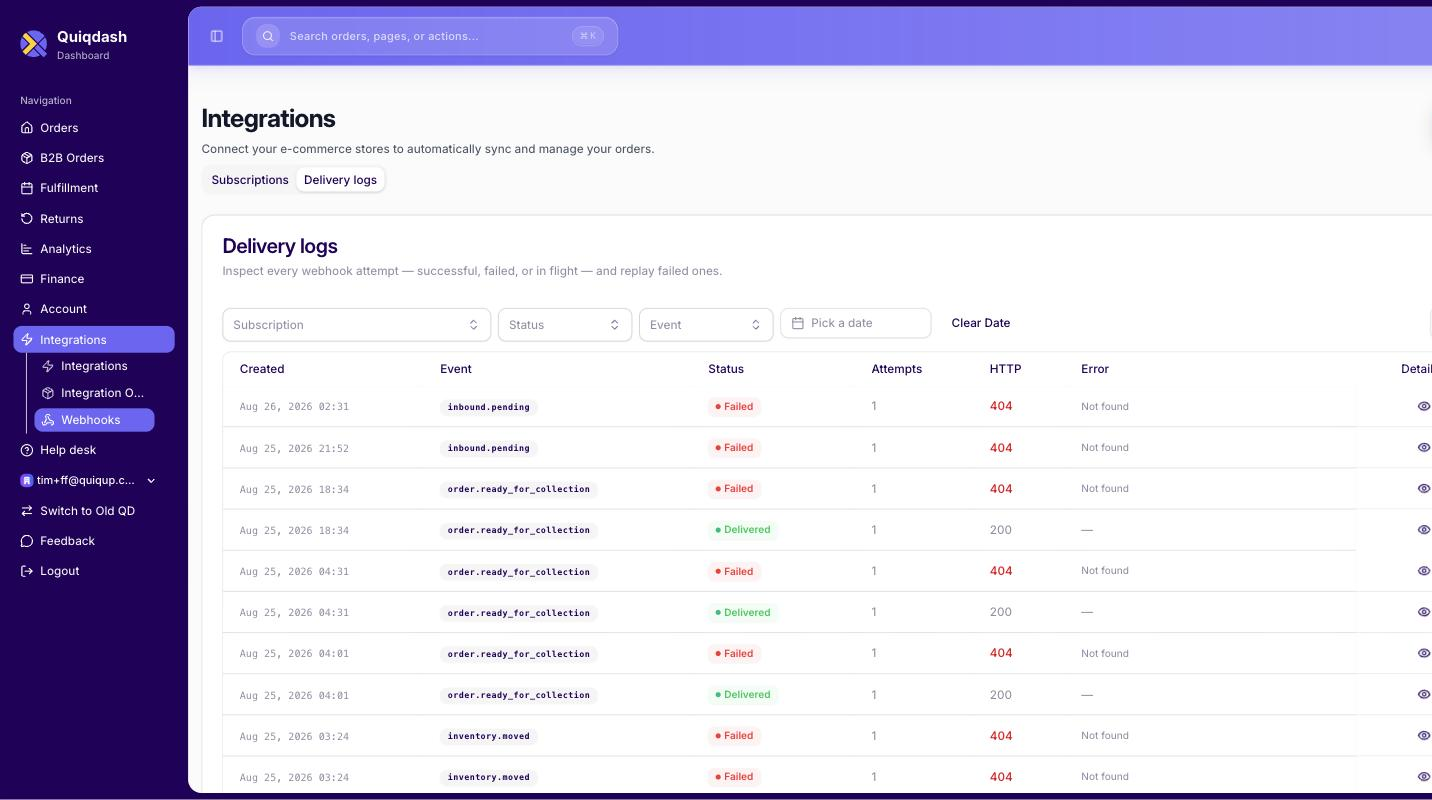
A 404 in that HTTP column means your endpoint returned 404, not that Quiqup could not find something.
Any 2xx counts as delivered. Live logs show both 200 and 202 recorded that way.
Then work through these in order.
| Check | Detail |
|---|---|
| Is a subscription active on this environment? | Quiqdash → Integrations → Webhooks. Staging and production are separate. |
| Is the URL HTTPS? | Non-HTTPS endpoints are rejected. |
| Is your endpoint returning 2xx within the timeout? | A 500 or a timeout triggers retries; repeated failures pause the subscription. |
| Did you receive some but not all? | Either the missing events are not selected on the subscription, or your receiver returned 2xx and dropped them. Check the subscription's Events first, then your own logs. |
| Was the order created in Quiqdash rather than by API? | It still emits events, but with no partner_order_id to match on. |
| Was the subscription registered before the order was created? | Registration is not retroactive. |
A delivery with status Failed can be sent again from Delivery logs without contacting support: open the entry and press Retry delivery. A replay is signed with X-Quiqup-Signature and a fresh timestamp, but it does not carry your custom headers or the legacy x-signature header, so a receiver that requires either rejects it. Entries with status Circuit open were never sent and cannot be replayed.
A subscription that keeps failing is paused. The Subscriptions tab shows each one as Active or Paused, with a Failures count, so a dead endpoint is visible rather than silent. Paused is the only name for it: a subscription you switched off yourself looks the same.
How it gets there:
- Every delivery that fails after its attempts adds one to the failure count. Any successful delivery sets it back to 0.
- From 10 failures, while the last one is under five minutes old, new events are not sent at all. They appear in the delivery log as Circuit open. After five minutes one event is sent again as a probe.
- At 50 failures the subscription is switched off and shows Paused.
Because of step 2, reaching 50 takes hours of failed probes, not 50 events in a row. Events that occur while a subscription is paused, or while the circuit is open, are not delivered later.
To re-activate it, fix the endpoint, open Edit, switch Active on and save. Saving an active subscription resets its failure count to 0. Then backfill what you missed from GET /orders/{order_id}/history.