Applies to both APIs. If you use the Shopify or WooCommerce connector you handle no credentials at all. The connector authenticates itself, and nothing on this page applies to you.
Every API request carries the same header:
Authorization: Bearer <token>One credential covers both APIs. Whichever of the two methods below you use, the resulting token authenticates against the Fulfilment host and the Last-mile host. There is no separate fulfilment credential, and nothing extra to request if you end up using both.
There are two ways to get that token. You only need one. Pick the column that describes you and ignore the other.
| Quiqdash Bearer token | OAuth client credentials | |
|---|---|---|
| How you get it | Generate it yourself in Quiqdash | Requested from Quiqup. Cannot be self-generated. |
| Turnaround | Immediate | A support request |
| Lifetime | You choose an expiry date, or none at all | Seven days, then refreshed by calling /oauth/token. See Token lifetime. |
| Extra call before you can use the API | None | Yes, exchange the id and secret for an access token |
| Environments | Generate one on each environment's dashboard and use it only on that host | A separate pair per environment |
| Use it when | You are building your own integration | A middleware or carrier platform asks for a Client ID and Client Secret, or you already hold a pair |
| What it can do | Everything | Exactly the same. There is no capability difference. |
If you generated a token in Quiqdash, you do not call /oauth/token at all. The Quiqdash token is the Bearer token. There is no exchange step and, if you set it to never expire, no refresh logic to write.
Choose on convenience: a Bearer token is immediate and self-serve, so use it unless a third-party platform forces the other.
This is the default path and the one to use unless something specifically requires a client id and secret. Generate the key on the dashboard of the environment you will call, and use it only on that host. The base URL you call is what decides where your orders go. See Which credentials cross environments.
Sign in to Quiqdash for the environment you want (staging or production). Both hosts currently carry
-beta, which is why this page links to Environments rather than printing a URL.Create a team. Click your account name at the bottom of the left navigation. On a new account this reads Create Team. Press it.
New accounts start without a team, and API keys live inside one, so this step is needed even if you are the only person who will ever use the account.
Once the team exists, that same menu shows Manage. Click it to open the Organization panel, then open API keys.
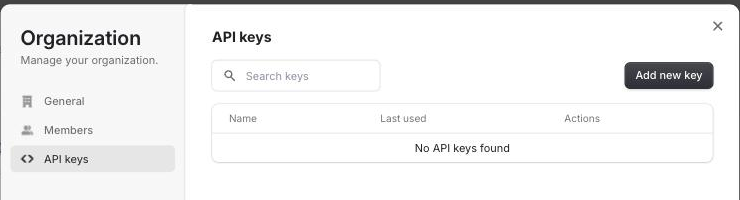
- Click Add new key. Give the key a name. Expiration is a dropdown, not a free-text date: Never, 1 Day, 7 Days, 30 Days or 60 Days. For a production integration, Never avoids the most common outage we see (below), but a key that never expires is only as safe as where you keep it: store it in a secrets manager, never in source control or client-side code, and rotate it on a schedule by creating a new key, deploying it, then revoking the old one. The line under the field tells you what you are about to get, so read it before pressing Create key. Keys can be revoked at any time.
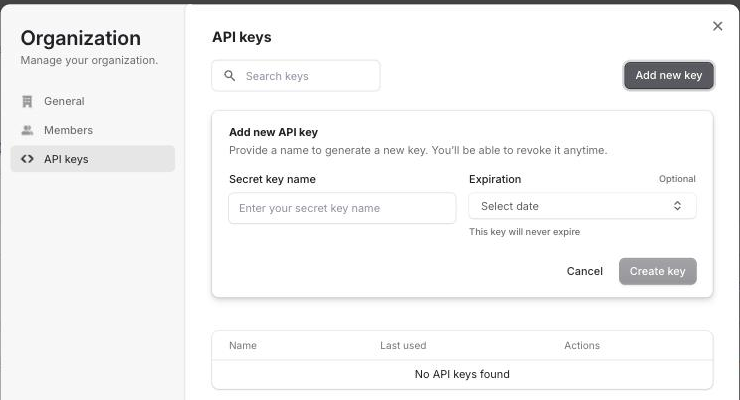
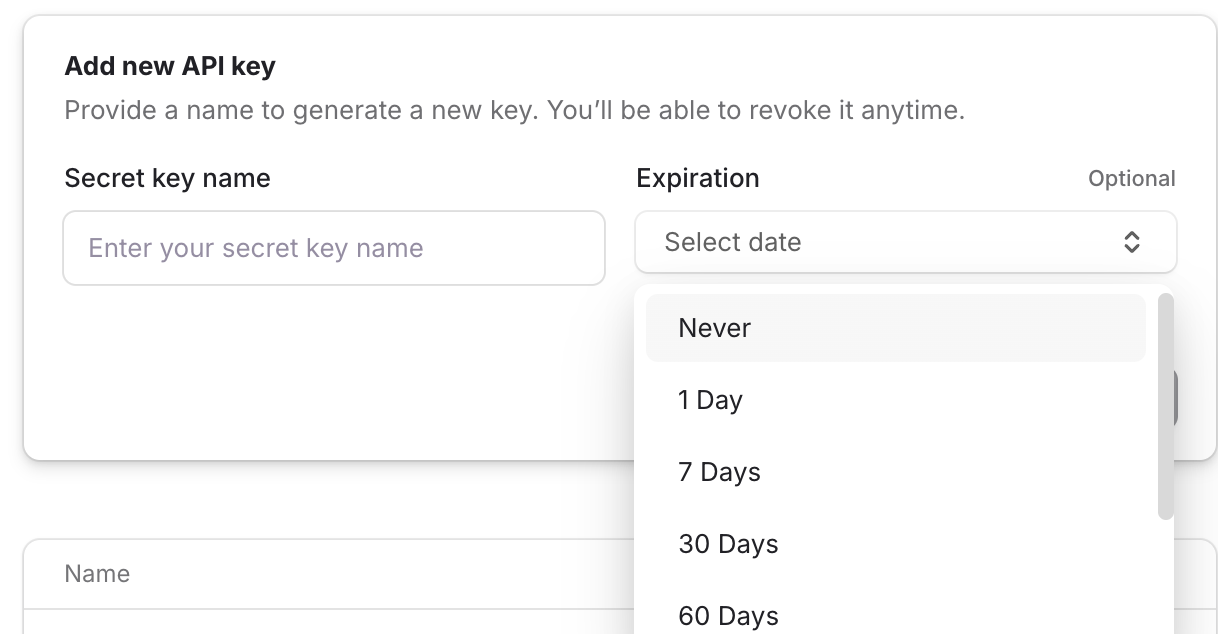
A key that stops working after a day or a week was almost certainly created with a duration selected. That is the most common cause of an integration that worked and then started returning 401 unauthorized out of nowhere. Check the key list, which shows the expiry against each key.
The key value is shown once, when the form is submitted, and cannot be retrieved afterwards. Copy it then. If you lose it, generate a new key and revoke the old one.
Send the key straight through on every request as Authorization: Bearer <key>.
The key list shows each key's name and when it was last used, so you can spot a credential nobody uses any more. To prove a token works, list orders. That endpoint requires page, per_page, from and to, so send them:
curl 'https://api.staging.quiqup.com/orders?page=1&per_page=1&from=2026-08-01&to=2026-08-31&filters%5Bstate%5D=pending' \
  -H 'Authorization: Bearer YOUR_QUIQDASH_TOKEN' \
  -H 'Content-Type: application/json'
A 401 means the token is wrong. A 400 or 422 means the token is fine and the query is not, so check the parameters before regenerating the key.
Webhooks live elsewhere, under Integrations → Webhooks. See Webhooks.
If the menu offers neither Create Team nor Manage, contact apisupport@quiqup.com. The account needs enabling.
A client_id and client_secret cannot be created in Quiqdash. Quiqup issues them on request. That is the one part of getting access that still needs a human.
Two situations need a pair:
- A middleware or carrier platform (Carriyo, ClickPost, Unicommerce, an OMS or a shipping plugin) has a setup screen with Client ID and Client Secret fields. Those platforms cannot take a Bearer token.
- You already hold a pair from an earlier integration. Nothing is forcing you to migrate.
Email apisupport@quiqup.com with all of the following. Every missing item costs a round trip.
Account email:      the address your Quiqup account is registered under, exactly
Business name:      as it appears on the account
Environment:        staging or production
Service:            which delivery services you will book
Integration:        the platform or partner you are connecting through
CC:                 your account manager
Staging is issued first. Production credentials follow commercial sign-off and a reviewed staging pass. See Going live.
Typically answered within the working day.
Send all three values as a form-encoded request body, the standard OAuth 2.0 form:
curl -X POST 'https://api.staging.quiqup.com/oauth/token' \
  --data-urlencode 'grant_type=client_credentials' \
  --data-urlencode 'client_id=YOUR_CLIENT_ID.apps.quiqup.com' \
  --data-urlencode 'client_secret=YOUR_CLIENT_SECRET'
The same three values are also accepted in the query string, and as a JSON body sent with Content-Type: application/json. Avoid the query string. URLs end up in proxy logs, access logs and shell history, and this one carries your client_secret. If you do use it, keep that URL out of anything you log.
Check the body, not the status. A rejected exchange does not always come back as an error status. A client_id that does not exist returns {"error": "invalid_client"} with HTTP 200 on staging and HTTP 401 on production; a wrong secret for a real id returns 401. Code that branches on response.ok can treat a failed exchange as a success and then find no access_token. Read access_token and treat its absence as the failure, whatever the status.
A request with no grant_type at all returns 401 with unsupported_grant_type.
{
  "access_token": "eyJhbGciOiJIUzUxMiIsInR5cCI6IkpXVCJ9.example.signature",
  "token_type": "Bearer",
  "expires_in": 604800,
  "refresh_token": "EXAMPLEREFRESHTOKEN0123456789ABCDEF0123456789AB",
  "created_at": 1616571253
}
access_token is what goes in the Authorization: Bearer header. It is not the client_secret, and it expires. Treat it as an opaque string: its format can change.
Which host you exchange on does not matter, within one environment. /oauth/token exists on the Last-mile and the Fulfilment host, and the token that comes back is accepted by both APIs of that environment. An integration spanning both APIs needs one exchange, not two. A token from staging is not accepted by production.
The response also carries a refresh_token. Exchange it for a new pair instead of sending the id and secret again:
curl -X POST 'https://api.staging.quiqup.com/oauth/token' \
  --data-urlencode 'grant_type=refresh_token' \
  --data-urlencode 'refresh_token=YOUR_REFRESH_TOKEN'
A refresh token works once. The response carries a new access_token and a new refresh_token. The old refresh token is then rejected with invalid_grant, so store the new pair before you use it, and do not refresh from two processes at once. If a refresh fails, exchange the client id and secret again.
Switch to the new access token straight away. The refresh revokes the old one, but the API can go on accepting it for a while, so a call that still succeeds with the old token does not mean the refresh failed.
Calling client_credentials again when the token expires is equally valid, and simpler if you keep the secret anyway.
A client_id ending .apps.quiqup.com is the current correct format. Nothing needs changing if yours looks like that.
If you generated a Bearer token in Quiqdash, it lasts as long as the Expiration you picked when you created it: Never, 1 Day, 7 Days, 30 Days or 60 Days. Pick Never and there is nothing to refresh and nothing below applies to you. Pick a duration and the key returns 401 unauthorized the moment it lapses, with no warning and no error that names expiry as the cause.
If you use client credentials, the access token returned by /oauth/token expires after expires_in seconds.
| Lifetime | |
|---|---|
| Access token | 604800 seconds, seven days. The same on staging and production. |
| Refresh token | Fourteen days, and single use. See Refreshing. |
Cache the access token until it expires and refresh on a 401. Do not call /oauth/token before every API request.
Read the lifetime from expires_in rather than hard-coding seven days. The response is the authority if the two ever disagree. Because the token lasts a week, a broken refresh path is first noticed a week after go-live, so exercise it on staging by refreshing deliberately.
If Quiqup rotates your credentials mid-integration, the old key stops working at the next authentication attempt rather than immediately. An expired token can surface downstream as something apparently unrelated. Label generation failing is a common way for it to show up.
A Quiqdash username and password will not authenticate against the API. Three different things are easy to confuse:
| What it is | |
|---|---|
| Quiqdash login | Email and password for the dashboard. Not usable against the API. |
| Bearer token | Generated in Quiqdash. Sent on every API request. |
client_id / client_secret | Issued by Quiqup. Exchanged for a Bearer token. Never sent to the API directly. |
The account also has to be enabled for API access. An account that is not yet enabled fails with a generic 500 or a timeout rather than a clear authorisation error, so the symptom does not name the cause.
A credential belongs to one Quiqup account or team and covers whatever services are enabled on that account.
- Separate brands on separate accounts each need their own credential.
- Separate emirate accounts each need their own credential.
- One account can hold several Bearer tokens. They are listed together under Organization → API keys.
- To send orders for several brands from one credential, Quiqup links each brand's account to yours under a
billing_identifier, and you send that identifier on each order. The order then belongs to the brand's account, and your account is its author. billing_identifier - The credential does not distinguish between the two APIs. Whether the fulfilment endpoints answer depends on whether your account has the fulfilment product, not on the key.
| Symptom | Cause | Fix |
|---|---|---|
invalid_client | client_id and client_secret swapped | Check the order. The id ends .apps.quiqup.com. |
invalid_client | Client credentials used against the wrong environment | A client id and secret only work on the environment they were issued for. Environment matters; which of the two APIs you are calling does not. Generate a Quiqdash key on the dashboard of the environment you call, too. |
invalid_client | client_id issued but not yet activated | Email support with the id prefix. |
401 Unauthorized | Token expired, or replaced by a refresh | Refresh it, or use a non-expiring Quiqdash token. After a refresh, send only the new access token. |
invalid_grant on a refresh | The refresh token was already used, or is older than fourteen days | Exchange the client id and secret again. |
401 Unauthorized | You sent the client_secret as the Bearer token | Exchange it at /oauth/token first, then send the access_token. |
308 redirect, then a failure | Trailing-slash redirect; the client dropped the POST body | Call the exact URL with no trailing slash. |
| Generic 500 or a timeout on every call | The account is not enabled for API access | Ask your account manager or support to check. |
You are not authorized with a valid token | An account capability is off | See below. |
This is rarely the token. Several capabilities are enabled per account. When one is off, the call fails with an authorisation error instead of telling you what is missing:
payment_modevalues, each enabled separately- Label generation
ready_for_collection- International export
Contact support with the endpoint and the exact error to have the capability checked.